


You’re cruising through Google Search Console, feeling good… until BAM! You spot the dreaded:
“Crawled – currently not indexed.”
Instant panic.
“Wait… what? Did I mess something up? Is Google ghosting me? Is my site broken?!”
Take a deep breath. You’re not alone.
This mysterious status freaks out a lot of folks and truth is, it’s not as scary as it sounds.
In fact, it’s super common and often misunderstood.
So, let’s bust some myths, clear the air, and explain what’s really going on when Google decides to play hard to get.
Table of Contents
First Off, What Does “Crawled – Currently Not Indexed” Mean?
Basically, it means:
Google saw your page, read it, scratched its chin, and went… “Meh, maybe later.”
So no, your page isn’t broken. It’s not penalized. Google just thinks it’s not juicy enough (yet) to serve in search results. It might be a bit too similar to other stuff out there, or just not adding enough value in its eyes.
Don’t take it personally, Google’s a picky reader.
To elaborate, the search engine probably doesn’t think your content adds enough unique value or quality compared to other content. So, it has decided not to put it in the main search results for now.
Where can I find the “Crawled – currently not indexed” status, and when does it appear?
To locate pages flagged with this status:
- Log in to Google Search Console and select your website property.
- Go to Pages under the Indexing section in the left-hand menu.
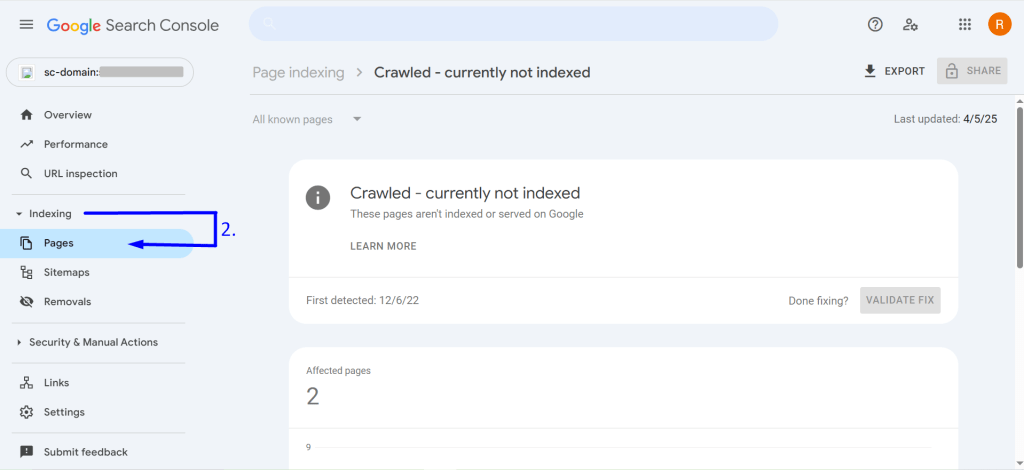
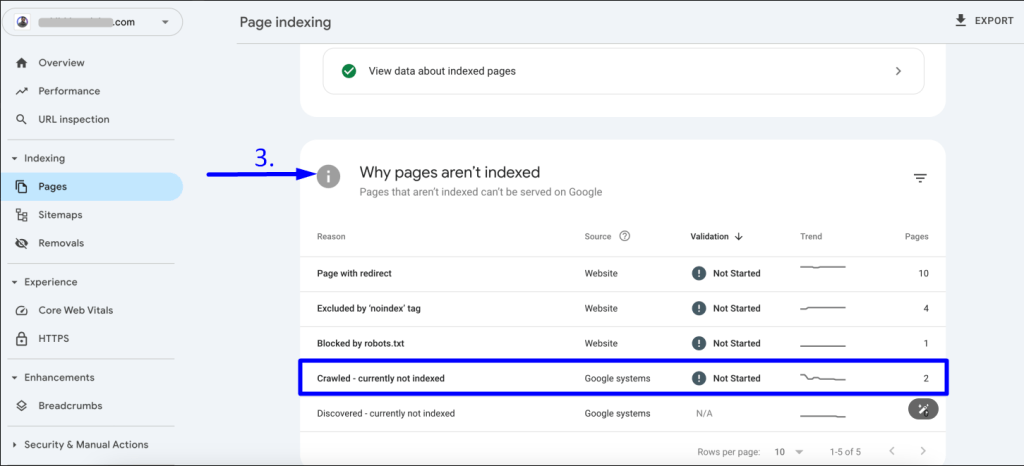
3. Scroll down to the Why pages aren’t indexed section and look for “Crawled – currently not indexed”.
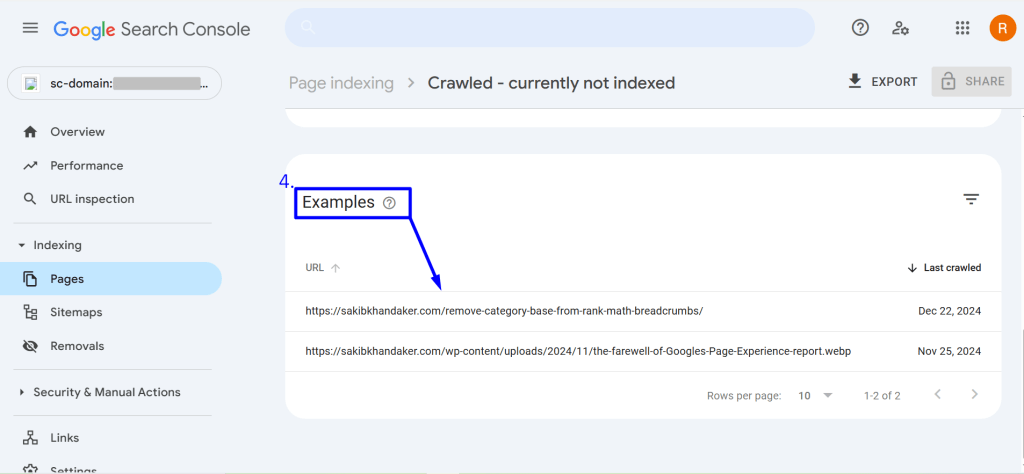
4. Click on this status to view the affected URLs in the “Examples” section.
Check out this documentation for detailed knowledge: Get started with Search Console
IMPORTANT: “Crawled – currently not indexed” – This doesn’t necessarily indicate an error; it’s just a warning message. It says that those pages won’t appear in Google Search results temporarily.
6 Biggest Myths about “Crawled – currently not indexed”
Let’s dig into the confusing stuff …
Myth 1: The Penalty Myth – My Page is Penalized!
You panic that Google has flagged your page for bad behaviour.
First things first- We’ve mentioned above that the message “Crawled – currently not indexed” is basically a warning; it’s not you or your faulty website.
So, relax!
So, the warning is not usually a penalty. “Crawled – currently not indexed” just means Google visited your page but chose not to add it to its search results yet. You may consider the fact as a “Google waitlist”.
These are some fixable errors, and there are more that people frequently encounter.
However, if lots of your pages end up “Crawled – currently not indexed”, then you might need to reconsider focusing on your site’s overall quality. It indicates that Google finds your overall site quality a bit weak or unconvincing compared to others.
Don’t worry! The solution is easy. Just make sure you check the site’s overall value regularly and work accordingly.
Get a clear picture of your site’s indexing status: Page Indexing report
Myth 2: Google Didn’t Even Read My Quality Content!
After seeing the message “Crawled – currently not indexed,” you may believe Google just glanced at the URL and ignored your hard work.
No, Google did crawl. Google processed your page and decided not to index it for now. The decision typically comes after looking at the content.
Here are some possible things Google might feel about the page:
- It isn’t quite as useful compared to other indexed content.
- Not unique or looks too similar to other pages.
- Doesn’t meet Google’s constantly changing quality standards. For example, Google might have checked for real insights, expertise, trustworthiness, etc.
Myth 3: Is My Page Dead to Google Forever?
Have you assumed the page is permanently banished from search results? People often think so!
The truth is that this is a temporary warning. Google often revisits pages and considers indexing pages.
The deeper insights say that Google can index your page later if things change. The changes may include updating your content and checking for basic SEO issues.
However, the search engine’s understanding of what’s beneficial might also change. So, it’s not definite, and it’s not always you.
Myth 4: It Must Be a Super-Complicated Technical Glitch!
Another imaginary reason for panic! You start looking for hidden code errors or server issues.
Indeed, sometimes, Google doesn’t index pages if there are technical problems. But, when you see the specific message, it usually means Google successfully visited and read the webpage.
We recommend checking for simple issues. Basic technical checks like ensuring you didn’t accidentally set the page noindex. Don’t assume there’s a serious technical issue.
Myth 5: If Google Crawled It, It Should Be Indexed!
It’s also a myth that people often mistake. Googlebot visiting doesn’t guarantee indexing.
To simplify the truth, Google crawls a lot of pages but doesn’t index them all.
✔ Discover is just step one: finding the page.
✔ Crawling is step two: analyzing the page’s content and structure.
✔ Indexing is step three: deciding if it’s effective enough to add to the search results database.
Moreover, you must know that Google has limited resources or a crawl budget. It aims for a high-quality index. The search engine actively filters out pages it deems low-value, redundant, or not particularly helpful to searchers. Just because Google can see your page doesn’t mean it wishes to show it to everyone.
Essential knowledge for your website success: Google Search Essentials
Myth 6: Shopify & WinnSEO App: “Crawled – Not Indexed” – Who’s the Reason?
This is the last, but a common misconception that “Crawled – currently not indexed” might result from poor SEO. So, you might eye Shopify and WinnSEO. As Shopify is equipped with good SEO, and WinnSEO also ensures solid SEO, you might think the warning indicates “a platform failure.”
Hmmmm.. your confusion is totally understandable.
The truth is that the “Crawled – currently not indexed” message has no connection with a platform. Also, it doesn’t always mean there are critical SEO issues.
However, we’re not saying you should ignore the SEO risks.
On larger stores, thin content, duplicate content, or poor internal linking might lead to the warning “Crawled – currently not indexed”. You can definitely work on these and improve your SEO.
WinnSEO can even be your personal SEO assistant.
“Crawled – currently not indexed”: Let’s find out the reasons & solutions
Here’s what you’ve been waiting for.
Let’s dive into the real reasons and fixes…
- Give it time, chill out! Google’s a busy bot. Sometimes, it just takes a bit for them to swing by and index your page after crawling. In addition, if your content/store is brand new, be patient. You may have just created your store, content or updated a page, but Google needs time to find it and process it. No need to worry right away!
- Is the content…thin? It means small content with fewer insights. Google likes meaty content. If your page barely has any text, images, or videos, it might not seem worth indexing immediately.
Relax, you have chances to update your content. - Duplicate content alert! If you have the exact same content on multiple pages, Google might get confused and not index all of them. So, invest time to make each page unique.
- Submit a sitemap, if you haven’t yet. A sitemap is like a roadmap of your website. Adding it helps Google discover all your important pages, even if they aren’t perfectly linked internally. It’ll help you with the indexing process fast.
- Add enough internal links. This is also important; you can think of internal links as bridges on your website. Make sure other relevant pages on your site link to this one “Crawled – currently not indexed”. However, high-quality backlinks from other reputable websites also help Google find your page.
- Find a standard SEO tool. Though a tool is not a direct rescuer, a tool like WinnSEO can surely play a role in refining your website’s SEO. From basic to advanced SEO suggestions, WinnSEO is excellent.
So, What’s the Real Story?
Let us revise the summary. “Crawled – currently not indexed” is not a serious or permanent issue. And, of course, it’s not always your fault.
So don’t let this status confuse you, but accept it as Google’s feedback. Spend more time following the tips, creating genuine content for your entire website, and updating it regularly.
And, take a breath, wait for the best results.