
A focus keyword is the main word or phrase you want your page or post to rank for in search engines. WinnSEO offers an excellent feature to adjust the focus keywords for your pages and posts.
Let’s know how you can use the feature and be benefitted.
Table of Contents
How to Research Focus Keyword
It’s all about figuring out what your target audiences are typing into search engines. For example, if you sell homemade cat foods, you’d want to think about phrases like organic cat foods, homemade cat foods, or even healthy cat foods.
To begin, just brainstorm a few general ideas. Get some general ideas, then peek at Google’s suggestions like “people also ask” to find more specific phrases.
Once you have a few ideas, you can use tools like Google Keyword Planner, Semrush, or Ahrefs. This helps you see how many people search for it and how tough the competition is. Remember, the sweet spot is looking for keywords that people actually use, but aren’t super hard to rank for.
For more in-depth guidance on effective keyword research strategies, be sure to check out our latest blog post on the topic: The Smart Way to Find Keywords: Get More Organic Traffic
Setting Focus Keyword with WinnSEO
Log in to your Shopify account and follow the below procedure.
On-Page SEO Settings
Access your Shopify store:
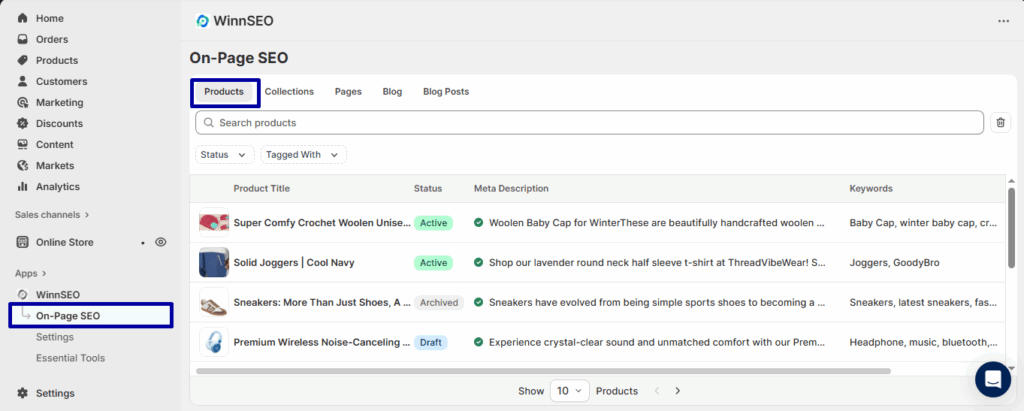
- Navigate to On-Page SEO of WinnSEO
- In the Products tab, choose the product which you want to edit.
Setting Keywords
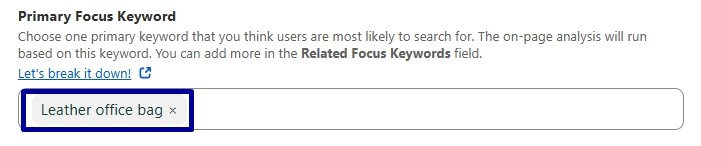
Say we have a product “Premium Leather Office Bag – Stylish & Durable Professional Briefcase for Men & Women” so the focus keyword we’ve selected is “Leather office bag”. And to give our content an extra boost, we’ve also added Professional briefcase, Men’s leather briefcase, Women’s office bag as related keywords.
WinnSEO Score
This is the “WinnSEO Score” section. It actually shows your content score based on how fair or good your content is, what improvements it needs, and the issues it found.
Basically, WinnSEO’s basically saying, “Alright, I’m gonna check out how well your page is optimized specifically for this keyword!”
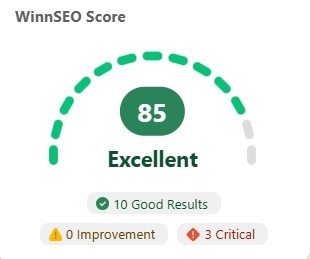
Here score range and their meanings are:
- Score 1-50: Flashing red, your on-page SEO’s struggling and needs serious work!
- Score 51-80: Showing yellow, your on-page SEO’s okay but could use a quick boost.
- Score 81-100: Green vibes, your on-page SEO’s rocking and in top shape!
How to optimize your focus keyword
Moreover, our pretty smart App gives you little suggestions to make your content awesome. These tests rely on the focus keyword you’ve set.
Check them out.
- Focus keyword in title: WinnSEO checks if your main keyword is present in your WinnSEO Meta Title, which is key for helping your target audience find you.
- Focus keyword in description: This refers to your meta description, the small summary Google shows in search. And, importantly, it confirms your main keyword is included there.
- Focus keyword in handle: WinnSEO will check if your main keyword is included in your post/page’s URL (handle). This helps search engines and users understand what your post/page is about at a glance, making it easier to find.
- Focus keyword in content: WinnSEO offers friendly tips on your main content, checking if you’ve used your main keyword effectively.
- Focus keyword in image alt: WinnSEO gives you feedback on your images, including whether you’ve added ALT texts to them. And of course, you should include the focus keyword here.
- Focus keyword density: You must use your main keyword well and sprinkle it naturally throughout your content. Our App also checks this and gives feedback accordingly.
This is all. Hope, now you can fine-tune your product pages and posts for search engines easily with the right keywords.
