
Why Duplicate Meta Tags Hurt Your Store
If you’re running a Shopify store, you already know how important SEO is for bringing in traffic and boosting sales. But here’s a common problem: duplicate meta tags. Think of duplicate meta tags like this: Imagine you’re organizing a closet and you put two identical labels on the same box. Does it really help? No, and it might even confuse you when you’re looking for something specific.
That’s pretty much what happens with duplicate meta tags on a website. If the same meta tag (title, description, or Open Graph data) shows up multiple times on a page, search engines get mixed signals. Instead of boosting your ranking, it can weaken it.
Result: lower visibility, weaker click-throughs, and missed sales opportunities.
The good news? WinnSEO for Shopify has a built-in feature to disable duplicate meta tags, keeping your store’s metadata clean, clear, and optimized for rankings.
Table of Contents
Why Removing Duplicate Meta Tags Matters for Shopify Stores
Cleaning up duplicate tags is a quick win for SEO. Here’s why it matters:
- Improved Search Rankings: Google sees one clear, optimized meta tag.
- Better Click-Through Rates (CTR): Customers get consistent titles and descriptions in search results.
- Faster Crawling: Search engines don’t waste crawl budget on duplicate signals.
- Cleaner Metadata: Your Shopify store looks more professional and trustworthy.
In short, duplicate meta tags dilute your SEO signals. By disabling them with WinnSEO, you make your store easier to understand, and easier to rank.
Disabling duplicate meta tags with WinnSEO from your Shopify Store
WinnSEO’s Duplicate Meta Tag Remover keeps things simple for your store. It takes care of those extra meta tags that can confuse search engines, making sure only the right ones from WinnSEO are active. Less hassle for you, better SEO for your store.
How to disable the duplicate meta tags from your Shopify store with WinnSEO
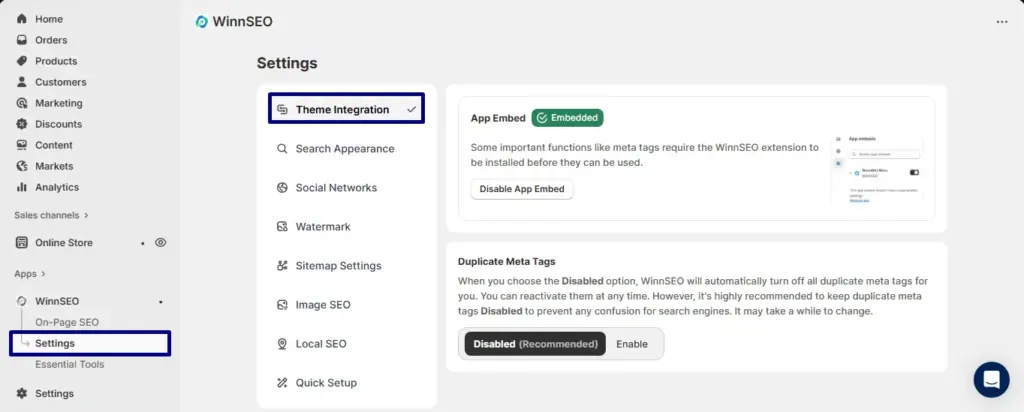
Log in to your Shopify store account and go to the WinnSEO App.
- Find Settings
- See, the Theme Integration tab is already selected
- Find Duplicate Meta Tags
- Now you can see the Disable/Enable button: Switching to Disabled? WinnSEO will quietly handle those duplicate meta tags for you. You can turn them back on anytime. Best to keep them off so search engines stay happy; just a little patience while it updates.
Which Meta Tags Does WinnSEO Disable?
WinnSEO disables the following meta tags from the store to avoid duplicate meta tags, as WinnSEO itself generates these meta tags:
Open Graph (Facebook/Meta) Tags:
- og:title
- og:description
- og:url
- og:site_name
- og:image (including width, height, alt, secure URL, type)
- og:updated_time
Twitter Card Tags:
- twitter:title
- twitter:description
- twitter:image
- twitter:card
- twitter:site
- twitter:label1, twitter:data1
- twitter:label2, twitter:data2
Product Tags:
- product:price:amount
- product:price:currency
- product:availability
- product:retailer_item_id
General SEO Tags:
- link rel=”canonical”
- meta name=”description”
- meta name=”keywords”
- meta name=”robots”
By handling these automatically, WinnSEO ensures your store sends one strong, optimized SEO signal instead of multiple weak ones.
Is It Safe to Disable Duplicate Meta Tags?
Yes, 100%. it’s recommended by SEO best practices. In fact:
- It improves SEO because Google gets a single, clear signal.
- The process is reversible, because we only disable so you can re-enable tags anytime.
- During uninstall, you can choose to restore old tags or leave them disabled.
NOTE: During uninstall, it needs to be enabled if you want to get back the old meta tags or leave it as it is.
Disabling duplicate tags with WinnSEO will not harm your Shopify store. Instead, it ensures your SEO works as intended.
FAQs: Duplicate Meta Tags in Shopify
Q: Do duplicate meta tags hurt my store SEO?
Yes. Duplicate tags confuse search engines and dilute your ranking signals, which can reduce visibility.
Q: Do I need coding knowledge to remove duplicate meta tags from my store?
No. With WinnSEO, it’s a one-click fix—no coding required.
Q: Will disabling meta tags remove important content?
No. WinnSEO only disables duplicate versions. Your optimized tags remain intact.
Final Takeaway
Keeping your Shopify store optimized is about clarity, not clutter. By disabling duplicate meta tags with WinnSEO, you’re ensuring:
- Clean metadata
- Better SEO rankings
- Stronger click-through rates
- A more professional, search-friendly store
Duplicate meta tags slow down your Shopify SEO, but WinnSEO makes it a one-click fix. By keeping your metadata clean and optimized, WinnSEO saves time, improves rankings, and helps you win more customers. It’s built for Shopify merchants who want to grow faster, smarter, and without technical headaches.
Already a WinnSEO user? Log in to your shopify store dashboard and disable duplicate tags today.
New to WinnSEO? Start Optimizing your store SEO and experience one-click SEO improvements built for Shopify merchants.
