


It’s totally understandable to feel a bit sad and curious when your pages aren’t showing up on Google! The thing is, getting indexed isn’t an instant “poof!” kind of deal; it actually takes some time. How long? Well, that depends on a bunch of factors. Honestly, a lot of it is up to Google itself. And just a heads-up, no SEO app or tool can magically force Google to index your pages overnight.
You can understand this from John Mueller, a Google Search Advocate. Once he put it: “You can’t index your pages. You can submit your pages for indexing, but ultimately, Google decides what gets indexed and what doesn’t.” So, while you can poke Google, the final call is its.
Table of Contents
What to Do When Pages Aren’t Indexing
Let’s know the possible actions that could be helpful when Google is not indexing your pages.
Check them out!
Confirm Your URL Isn’t Indexed
Before you start troubleshooting, you need to be absolutely sure your page isn’t indexed. You’ve got some good tools right at your fingertips to double-check your pages. These are super helpful:
- The site operator: This is a quick and easy way to see if your site or a specific page is already in Google’s index. Just go to Google and type site:yourdomain.com/your-specific-page into the search bar If it shows up, awesome! If not, you know there’s work to do.
- Google Search Console’s URL inspection tool: It can be your best friend when it comes to indexing. It’s a free tool from Google that lets you paste in any URL from your site and get a full report. You’ll see if it’s indexed, when Google last looked at it, and if any issues are preventing the URL from showing up. This tool gives you the definitive word on whether Google knows about your page and if it’s currently indexed. Don’t skip this step!
Check Robots Meta Tag
Check your page source code and make sure the robots meta is not set to Noindex. If it is set to Noindex and you’re using WinnSEO, follow these steps:
Here’s how to check and fix it in your Shopify admin:
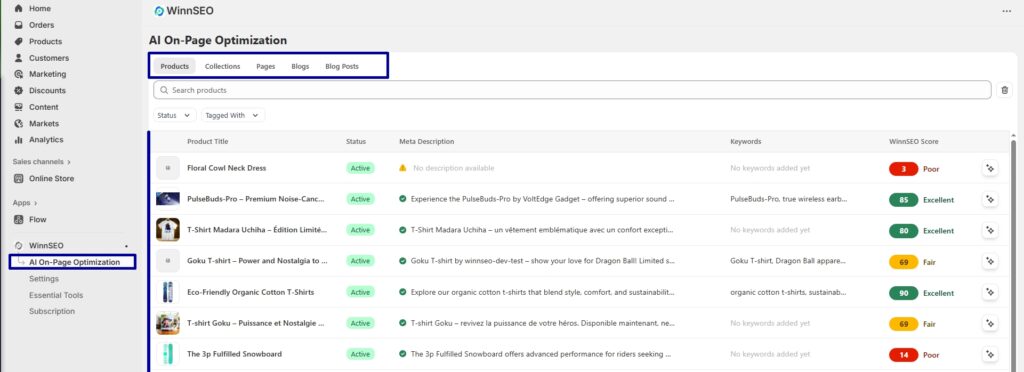
- Navigate to the WinnSEO App and select On-page SEO
- In the “On-page SEO” section, use the search bar to find the specific product, collection, or page you’re having trouble with
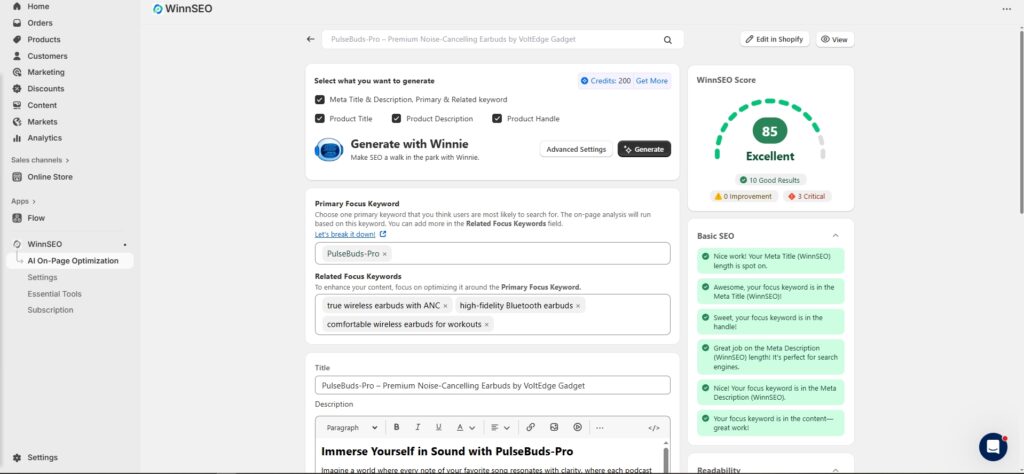
- Click on its title to edit its SEO settings.
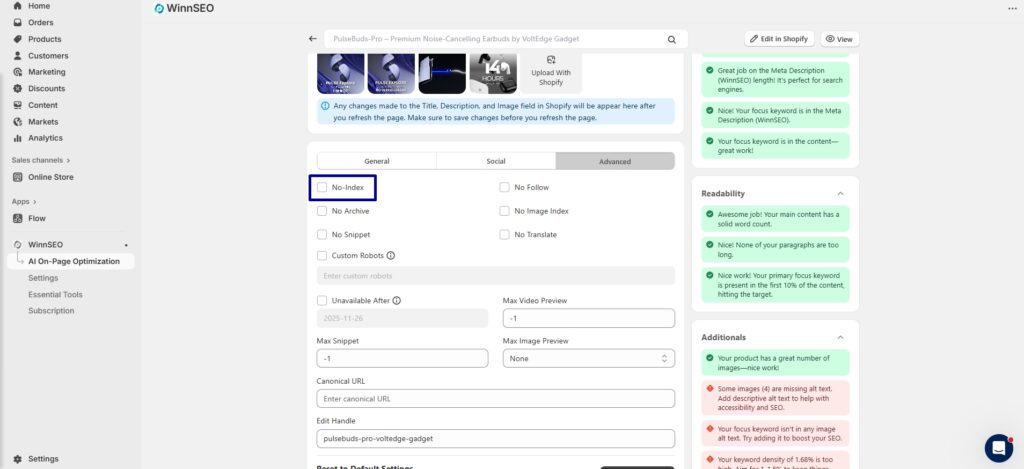
Now, scroll down and click on the “Advanced” tab.
Want to give Google a green signal?
Here is the chance! You just have to uncheck the two boxes. If the No-Index box is checked, it means your page is actively being told not to appear in search results. Also, double-check the “No Follow” box to uncheck to ensure search engines can follow links on your page.
Verify Robots.txt Isn’t Blocking Google
Your robots.txt file, that usually found at yourdomain.com/robots.txt, acts like a traffic cop for search engine crawlers. It tells them which section of your site they’re allowed to visit and which they should avoid. So, be confirm there isn’t a Disallow: rule accidentally blocking the specific page or even your entire site from being crawled. Even a single / in a Disallow rule can shut down access to your whole site.
But don’t worry! It’s also a common oversight!
Are Your Pages Crawled But Not Indexed?
This is a small but important distinction! Google might have visited your page or crawled it, but decided not to add it to its index. The URL Inspection Tool in Google Search Console is key here. It will tell you if the page was “Crawled – currently not indexed” or “Discovered – currently not indexed.” Check, is this the case? Then it may point to content quality issues and thin content. Or Google mayn’t consider the page as unique or valuable enough to include.
Ask Google to Index Your Page
Once you’ve made any necessary fixes like removing a noindex tag or updating your robots.txt, you can give Google a gentle nudge to revisit your page. No worries, you’ve got the easiest way. Go back to the URL Inspection Tool in Google Search Console for that specific page and click the “Request Indexing” button. This puts your page in a queue for re-evaluation. But it’ll be wise to tell Google to discover your changes sooner rather than waiting for its regular crawling schedule.
Recently added or made changes to your pages? Learn how to “Ask Google to recrawl your URLs”
The journey of indexing your pages by Google may feel a bit like a mystery, or take a longer time, but you’re not alone. It happens! Follow the above instructions carefully, address the common issues, and take the necessary action accordingly. You’ll definitely get positive results.