
Baidu is a popular search engine in China. It works much like other search engines but is designed for Chinese users. Though it’s not well-known outside the country, you can still add your site to Baidu if you want.
WinSEO helps to add your website to Baidu without any hassle. In this documentation, we’ve outlined the procedure for you. Let’s start.
Verify Your Website with Baidu Using WinnSEO
There are only two steps. Follow them below:
Step 1: Set up Your Site on Baidu
- Log in to your Baidu account on the Baidu Webmaster Tools.
- Enter your website’s URL and specify if it uses HTTP or HTTPS.
- After that, click Next “下一步”.
- Choose your website’s industry categories.
- Finally, copy the code provided under the HTML tag option.
Step 2: Verify Your Website on Baidu With WinnSEO
After successfully connecting your website to Baidu, you can then verify it on Baidu using WinnSEO.
So, access your Shopify store.
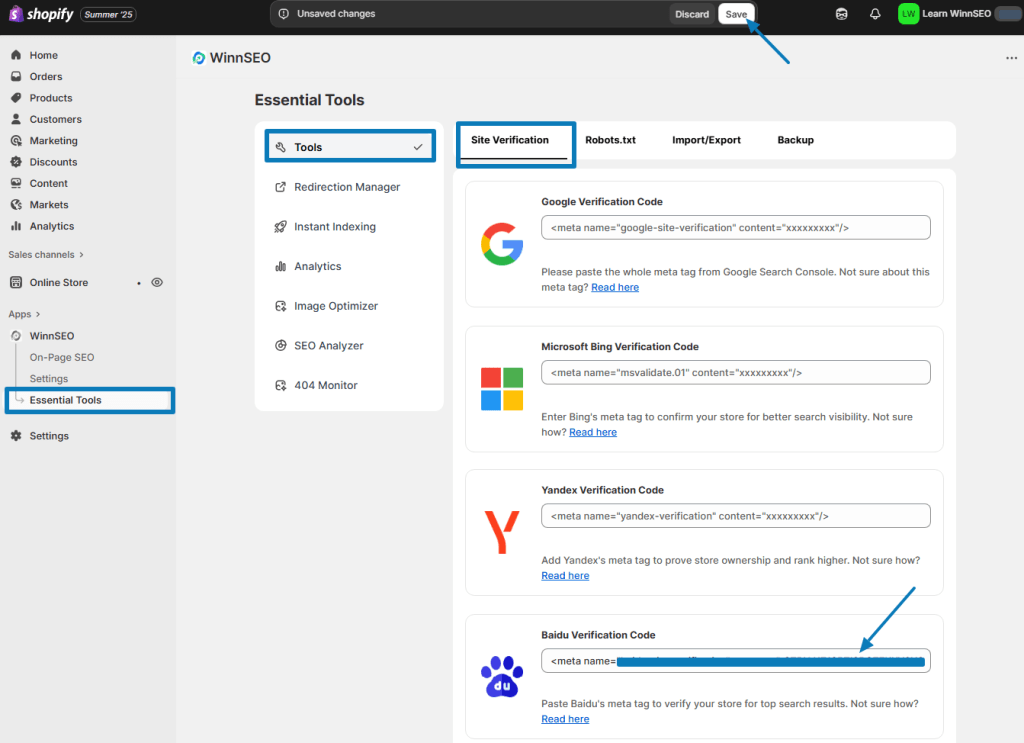
- Find Essential Tools under WinnSEO.
- You’ll find Site Verification tab under Tools
- Scroll down, you’ll see the Baidu Verification Code field. You have to paste the copied meta tag (the code by the Webmaster you’ve copied earlier) here.
- Save the changes to your website.
Now, you just need to switch back to Baidu to complete the verification process by clicking the “Complete Verification” (完成验证) button.
And just like that, your website is ready to be discovered on Baidu!
